Fifteen seconds, 1920×1080, thirty frames a second. Four hundred and fifty frames.
Nobody opened a timeline to make it. It is a React component and a thirty-line JSON file, rendered by the same API we sell. We built it partly because we needed a launch video and partly because using your own thing on something that matters is how you find out what it's like.
It did not go smoothly, which is the more useful half of the story.
Borrowing an effect that was never meant to be a video
The telescope zoom comes from a public tutorial by joffreysp, pinned at 8a0e22d. Panels of footage rush the camera and collapse into a mark. We kept its layer order, mask geometry, panel positions and GSAP timing, and changed one thing.
The original runs on scroll. progress comes from the scrollbar, and every panel scale and mask offset hangs off it. That works beautifully for a person with a mouse and not at all for a renderer, which never scrolls and asks for frames in whatever order it feels like — sometimes in parallel, sometimes on different machines.
So progress comes from the frame number instead:
const frame = useCurrentFrame();
const {fps} = useVideoConfig();
const time = frame / fps;
const progress = Math.max(0, Math.min(1, (time - 1) / 8));
That substitution is most of the port. Everything downstream was already a pure function of progress, so the animation became a pure function of the frame.
GSAP needed the same treatment. On the web you build a timeline and play it, which means it advances against a wall clock — again, fine for a browser, useless when frame 300 might be rendered before frame 12. We use GSAP for its curves and never start anything:
const easedProgress = gsap.parseEase('power1.inOut')(progress);
parseEase hands back a plain function from 0..1 to 0..1. Same motion feel, no time dependence, no Date.now() anywhere in the component.
Fonts don't load on cue
Our acceptance criteria included "no blank or loading frames." On the web that requirement is nearly free, because a person arrives at an unpredictable moment and forgives the first instant. A renderer arrives at frame 0 and photographs whatever is there.
const [ready] = useState(() => delayRender('font and mask'));

useEffect(() => {
  const font = new FontFace('CueFrame Zodiak', `url("${assets.zodiak.handle}")`);
  const mask = new Image();
  mask.src = assets.mask.handle;
  Promise.all([font.load(), mask.decode()])
    .then(() => { /* install them */ continueRender(ready); })
    .catch(cancelRender);
}, []);
cancelRender in the catch matters as much as the rest. A font that 404s should kill the render, not quietly ship 450 frames of Helvetica.
Two things went wrong before a frame was rendered
We declared the SVG logo as an image asset. The error came back as "does not resolve to matching org media," which sounds like a permissions problem and is not — the logo is stored as data, and the message was describing a kind mismatch in the vocabulary of an ownership failure. That one cost us a while.
Then the ocean footage. Pexels clip 10756361 advertises 3840×2160; the file it actually serves is 1280×720. Our own resolution guard rejected it on ingest, which was the system working, though it did not feel that way at the time. We swapped in different footage.
The composition
This is the entire edit:
{
  "v": 1,
  "format": { "aspectRatio": "16:9", "fps": 30, "resolution": "fhd" },
  "tracks": [{
    "id": "launch",
    "kind": "overlay",
    "name": "Telescope launch",
    "contents": [{
      "id": "telescope-launch",
      "startTime": 0,
      "duration": 15,
      "source": {
        "kind": "alpha-layer",
        "componentId": "cueframe-telescope-launch",
        "assets": {
          "ocean": "<asset id>", "river": "<asset id>",
          "forest": "<asset id>", "dunes": "<asset id>",
          "mask": "<asset id>", "logo": "<asset id>",
          "zodiak": "<asset id>"
        },
        "props": {}
      }
    }]
  }]
}
One track, one clip, seven named assets. The component asks for ocean and mask; the composition decides what those names point at. Different footage is a different value in that map, not a code change.
The preview that never finished
The first full preview timed out after ten minutes. When we looked, it had completed frame 127 of 450 — four stock videos, six masked layers and ten small video panels, one frame at a time, in a two-CPU sandbox.
We tried @remotion/media in place of OffthreadVideo. It was faster and it failed visual comparison at SSIM 0.667 against the accepted frames, so we threw it away. Worth saying plainly: the fast version was rejected because it looked wrong, and we only knew that because we compared pixels rather than watching it.
The version that worked shares one decoded video source across the panels instead of decoding several. Same geometry, same masks, same GSAP timing — different internals. Adopting it took one line:
-            "componentId": "cueframe-telescope-launch",
+            "componentId": "cueframe-telescope-shared-ocean",
On the same 61-frame segment:
| before | after | |
|---|---|---|
| Total bake pipeline | 154.3 s | 82.1 s |
| Frame generation | 67.8 s | 30.5 s |
| Encoding | 32.1 s | 9.5 s |
SSIM against the earlier render: 0.9868.
We are not claiming a general speedup. This was one component and its media resolution, on one workload, and there is plenty left — a full 450-frame bake still runs into the minutes.
Reviewing it
We checked the render as a contact sheet rather than by watching it.
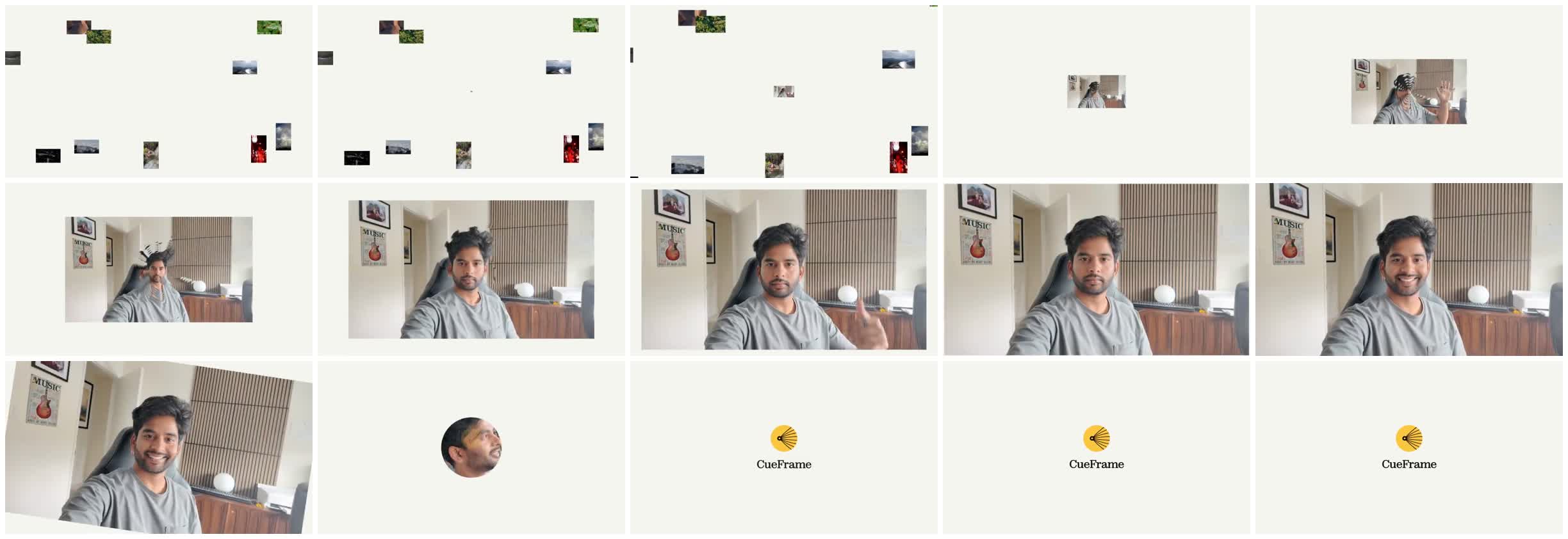
A bad frame at a scene boundary lasts 33 milliseconds and your eye will cover for it. Laid out as stills it is obvious, and because frames are addressable by number you can pull exactly the ones your criteria called for — the opening, each boundary, the final hold.
The plan we started with described five scenes across thirty-six seconds. We shipped one component and fifteen. That is its own kind of lesson.
If you want the shape of this for your own work, the composition API guide covers the document model and rendering video from JSON covers the render call.